

So you tried AI image generation, typed something “simple,” and the result looked like a cursed meme from 2013. Congrats — you’ve officially entered the world of prompting.
Mistake #1: The “One-Word Prompt”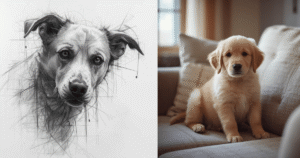
Example: “Dog.”
Cool. You just asked the AI to generate literally any dog in the universe. That’s like walking into a restaurant and saying, “Food.”
Fix: Add details.
Better prompt: “Golden retriever puppy sitting on a couch, natural window light, cozy living room, soft focus.”
Mistake #2: Writing a Whole Novel
Example: “A dog that looks like my childhood dog, but slightly older, sitting in my grandma’s old house with the green couch and the weird lamp and…”
The AI is not your therapist. It doesn’t need your backstory.
Fix: Keep it focused. Short, clear, specific.
Better prompt: “Golden retriever on a vintage green couch, warm indoor lighting, 1970s living room style.”
Mistake #3: Zero Style Direction
Example: “A car on a road.”
Okay, but is this a Pixar movie? A car ad? A video game? A fever dream?
Fix: Tell the AI what style you want.
Better prompt: “Red sports car on a mountain road, cinematic style, dramatic lighting, 4K, ultra realistic.”
Mistake #4: Forgetting About Lighting
Example: “Portrait of a woman.”
Lighting is everything. Without it, your image looks flat, muddy, or like a stock photo from 2009.
Fix: Add lighting terms.
Better prompt: “Portrait of a woman, soft studio lighting, shallow depth of field, blurred background, professional headshot.”
Mistake #5: Asking for “Realistic” But Forgetting Reality
Example: “Ultra realistic fantasy dragon flying over a city at night with fireworks and 10 moons and glowing lava and…”
Pick a struggle. You can’t ask for “realistic” and then describe a scene that breaks physics 47 times.
Fix: Decide: realistic or surreal. Then commit.
Better prompt: “Epic fantasy dragon flying over a medieval city at night, dr
amatic lighting, cinematic, detailed illustration.”
Mistake #6: Ignoring the Background
Example: “A person standing.”
Standing where? In a void? In a parking lot? In your unresolved emotional issues?
Fix: Tell the AI where this is happening.
Better prompt: “Person standing on a city rooftop at sunset, skyline in the background, warm orange and pink sky.”
Mistake #7: Overstuffing the Prompt
Example: “A cat, a dog, a dragon, a castle, a spaceship, a forest, a city, and a beach, all in one image.”
This isn’t a crossover episode. The AI will try, but the result will look like a collage made by chaos itself.
Fix: Focus on one main subject and one main setting.
Better prompt: “Dragon flying over a medieval castle at night, full moon, dramatic clouds, fantasy illustration.”
Mistake #8: Not Using Negative Prompts
Example: You get extra limbs, weird text, or nightmare hands and just… accept it.
Why suffer?
Fix: Use negative prompts to tell the AI what you don’t want.
Better prompt: “Portrait of a woman, soft studio lighting, realistic, no extra li
mbs, no distorted hands, no text.”
Mistake #9: Forgetting to Mention Camera or Art Terms
Example: “A photo of a car.”
Want it to look like a real photo? Then talk like a photographer, at least a little.
Fix: Add camera or art language.
Better prompt: “Photo of a red sports car, shot at 50mm, shallow depth of field, motion blur, golden hour lighting.”
Mistake #10: Expecting the First Try to Be Perfect
Example: You type one prompt, don’t like the result, and decide “AI is bad.”
Relax, speedrunner. Prompting is iterative.
Fix: Treat it like a conversation. Adjust, refine, regenerate.
Better approach: Change one thing at a time — lighting, style, angle, or background — and re-run.
Mistake #11: Being Vague About the Mood
Example: “A house in the forest.”
Is this a horror movie? A cozy cabin? A fairy tale? The AI doesn’t know your vibe unless you say it.
Fix: Add mood words.
Better prompt: “Cozy wooden cabin in a forest, warm glowing windows, foggy morning, peaceful, cinematic.”
Mistake #12: Not Saving Good Prompts
Example: You finally get something perfect… and then forget exactly what you typed.
That’s not “creative chaos.” That’s just pain.
Fix: Save your best prompts. Build your own little prompt library.
Pro move: Keep a notes doc or use a prompt manager. Copy, tweak, reuse, repeat.
Quick Fix Formula: How to Write a Solid Prompt Every Time
When in doubt, use this structure:
Subject + Style + Lighting + Mood + Background + Extra Details + (Optional) Negative Prompts
Example:
“Professional headshot of a young man, studio photography style, soft even lighting, neutral background, sharp focus, realistic, no distorted hands, no text.”
Clean. Clear. AI-friendly. No chaos.
Final Thoughts
You’re not “bad at prompting” — you just weren’t given the manual. Now you’ve got one.
Stop typing vague, chaotic prompts and expecting magic. Start being specific, intentional, and a little bit bossy. AI actually likes that.
And if you ever forget all this, just remember: if your prompt sounds like a confused text to a friend, the image will look like one too.
AiPicPro’s whole mission: make this stuff simple, honest, and low‑stress — with just enough slang and sarcasm to keep it fun.